1. Overview
This solution implements a production-ready Model Context Protocol (MCP) server and client pair using Spring AI's annotation-driven programming model. The server exposes business tools via @McpTool annotations over Streamable HTTP transport; the client connects and automatically registers all discovered tools into Spring AI's ChatClient tool execution pipeline.
The problem it solves is straightforward: when teams want to expose internal services as AI-callable tools, naive implementations become operationally fragile. Typical failure patterns include:
- Tight coupling between tool definitions and the AI host: tools are registered directly in the AI application, making every new tool a deployment of the AI service itself.
- No standard protocol: tool calling logic is bespoke per application, with no interoperability between different clients, agents, or AI frameworks.
- Static tool registration: available tools are fixed at startup; adding, removing, or updating tools requires a full restart of the AI application.
- Missing trust boundaries: the LLM host and the tool implementation share a process, meaning a tool failure can crash the AI service, and there is no natural authorization boundary between them.
- No visibility into tool calls: tool invocations happen inside prompt pipelines with no structured logging, tracing, or audit trail.
Existing approaches often fail in production because they treat tool calling as an in-process concern—functions registered inside the same Spring Boot app that runs the LLM interaction. When tool sets grow, when teams want to share tools across multiple AI applications, or when tools need independent scaling and deployment, the monolithic model breaks down.
This implementation is production-ready because it treats tools as a separate, deployable concern:
- The MCP server owns tool implementations and exposes them over a standard HTTP transport. It can be deployed, versioned, and scaled independently.
- The MCP client auto-discovers all server tools at connection time using
ToolCallbackProvider, requiring zero code changes in the AI host when tools are added. - Dynamic tool registration allows the server to add and remove tools at runtime; the client always retrieves the current tool list on each invocation without restart.
- Transport is Streamable HTTP (MCP spec 2025-03-26), which supports stateful sessions, connection resumability, and stateless deployments for horizontal scaling.
- OpenTelemetry spans correlate inbound chat requests with MCP tool call events for end-to-end observability.
2. Architecture
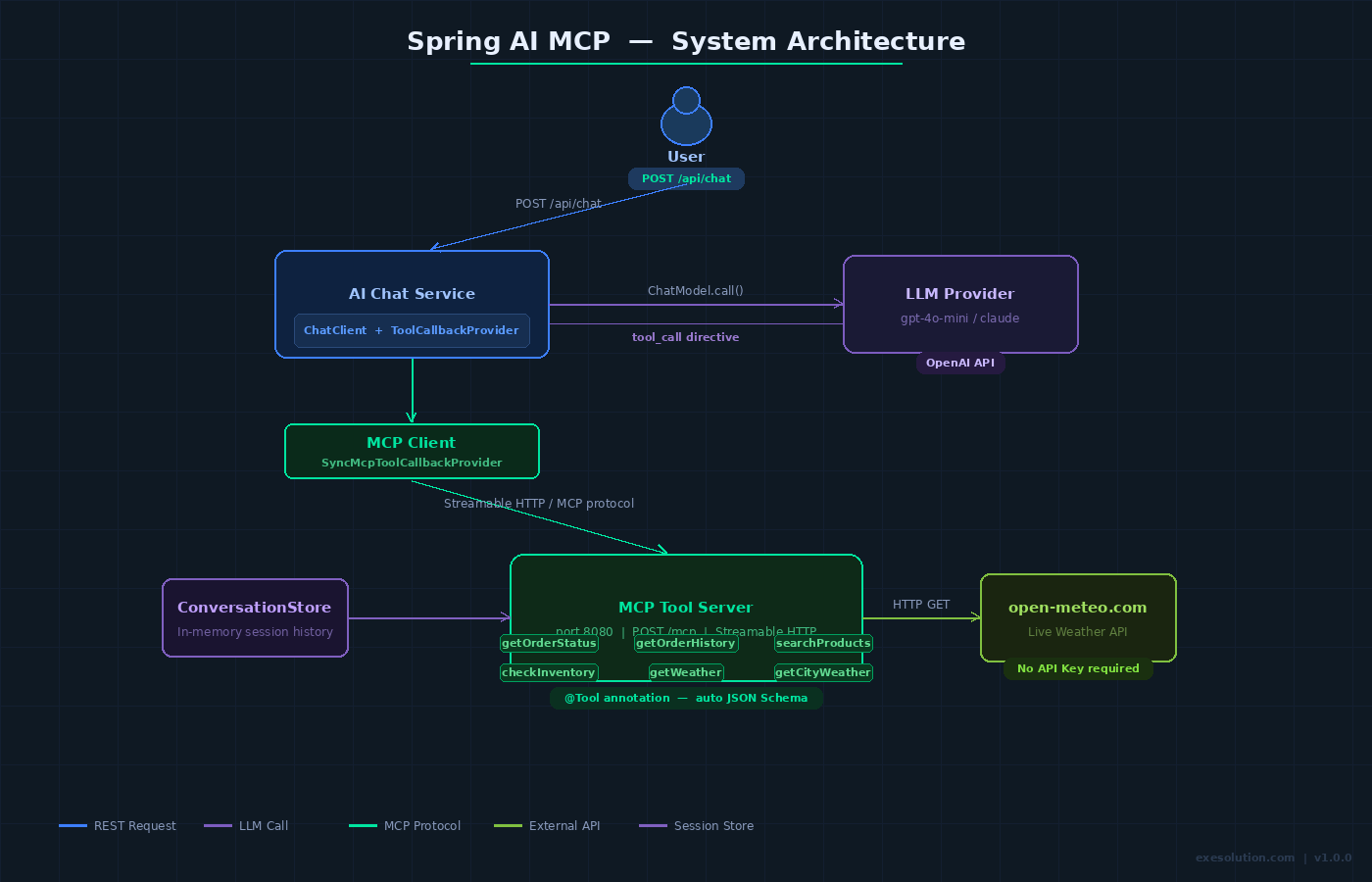
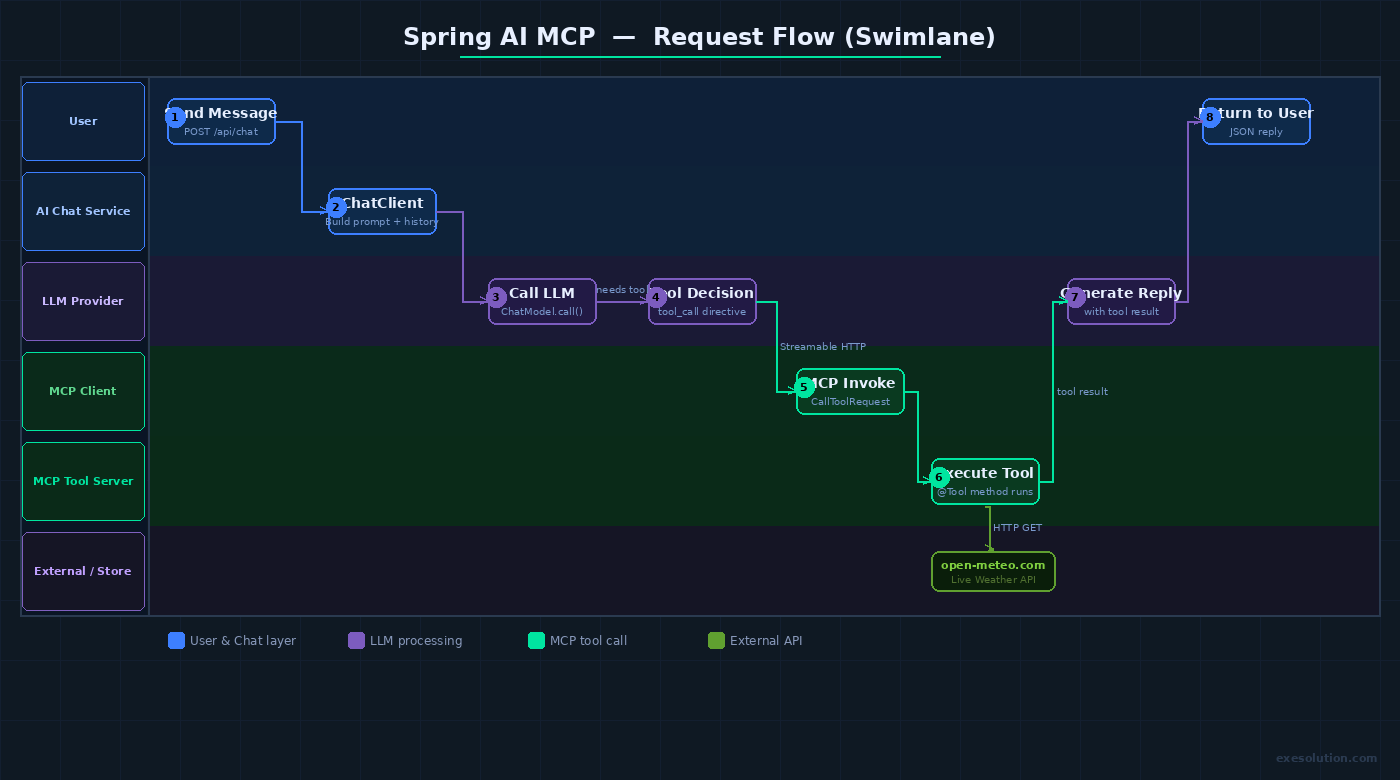
Request flow and dependencies:
- User → Spring Boot AI Host (REST API,
POST /api/chat) - AI Host →
ChatClient(Spring AI) → LLM provider (OpenAI-compatible) - LLM decides to call a tool →
ChatClientinvokesMcpSyncClientToolCallbackProvider McpSyncClientToolCallbackProvider→ MCP Client → MCP Server (Streamable HTTP,POST /mcp)- MCP Server →
@McpTool-annotated service method → returns structured result - Result propagates back: MCP Server → MCP Client →
ChatClient→ LLM → final response → User
Components:
- MCP Server (
mcp-tool-server): a standalone Spring Boot app. Exposes@McpTool-annotated beans as MCP tools over Streamable HTTP. Owns all tool implementations and their external service integrations. - MCP Client (
mcp-tool-client): embedded in the AI Host.spring-ai-starter-mcp-clientauto-configuresSyncMcpClientbeans and exposesMcpSyncClientToolCallbackProviderforChatClientwiring. - AI Host (
ai-chat-service): the user-facing Spring Boot app. HoldsChatClientwired with the MCP client'sToolCallbackProvider. Has no knowledge of specific tool implementations. - Tool Callback Provider: the bridge that retrieves the current tool list from the MCP server on every invocation, enabling dynamic discovery.
- Streamable HTTP transport: the MCP protocol transport. Supports both stateful sessions (with
Mcp-Session-Idheaders) and stateless request-response mode. - OpenTelemetry instrumentation: spans for chat requests, MCP connection, tool dispatch, and tool execution are exported to an OTLP collector.
Trust boundaries:
- AI Host → MCP Server boundary: tool calls cross a network boundary. The MCP server can enforce per-tool authorization, rate limits, and input validation independently of the AI host.
- LLM → tool boundary: the LLM produces tool call directives; the AI host must not forward raw LLM output to the MCP server without schema validation. Spring AI handles this via the structured
CallToolRequestformat. - MCP Server → external services boundary:
@McpToolimplementations call databases, APIs, or other internal services. These calls must be guarded with timeouts and their own auth.
3. Key Design Decisions
Technology stack
- Spring AI 1.1.x: chosen because it provides first-class MCP support through Boot Starters and the
@McpTool/@McpResource/@McpPromptannotation model. The alternative—manual MCP Java SDK wiring—requires boilerplateToolSpecificationregistration and lacks auto-configuration. - MCP Java SDK 0.13.x: the official Java SDK, co-maintained by Spring/Broadcom and Oracle contributors. Upgraded from 0.10.x to gain Streamable HTTP support and the 2025-06-18 spec compliance.
- Streamable HTTP transport: chosen over STDIO (only suitable for local/desktop deployments) and legacy SSE (unidirectional, polling-based). Streamable HTTP supports both stateful sessions and stateless scaling, making it the right default for service deployments.
spring-ai-starter-mcp-server-webmvc: servlet-based server transport, compatible with standard Spring MVC deployments without requiring reactive stack. For reactive deployments,spring-ai-starter-mcp-server-webfluxis the alternative.spring-ai-starter-mcp-client: JDK-based HttpClient transport.spring-ai-starter-mcp-client-webfluxis the WebClient-based alternative; both are functionally equivalent for this solution.
Annotation-driven tool registration
Spring AI's @McpTool, @McpToolParam, @McpResource, and @McpPrompt annotations are processed at startup to register tool specifications with the MCP server. This eliminates manual ToolSpecification builders and keeps tool metadata (name, description, parameter schema) co-located with implementation:
@McpTool(description = "Look up order status by order ID")
public OrderStatus getOrderStatus(
    @McpToolParam(description = "The order identifier") String orderId) { ... }
The annotation processor generates the JSON Schema for parameters automatically from method signatures and JavaDoc-equivalent descriptions.
Dynamic tool discovery
The MCP client's ToolCallbackProvider does not cache tool definitions at startup. Per Spring AI's MCP design, it re-fetches the current tool list from the server on each getToolCallbacks() invocation. This means the server can register new @McpTool beans via a separate registration endpoint at runtime, and the next AI interaction will pick them up without restarting either the server or the client.
Stateful vs. stateless transport
- Stateful (default): the server issues a
Mcp-Session-Idresponse header on first request. The client includes this ID on subsequent requests, enabling session-scoped state (e.g., open database cursors, transaction context). - Stateless: set
spring.ai.mcp.server.protocol=STATELESSon the server. Each request is independent; the server returnsapplication/jsonrather than a streaming response. Appropriate for horizontally scaled deployments behind a load balancer with no session affinity.
Error handling
@McpToolexceptions are caught by the MCP server framework and returned as structured MCP error responses withisError: trueand a descriptive message. The LLM receives the error message and can reason about recovery.- Network failures between the MCP client and server surface as
McpExceptionin Spring AI's tool execution pipeline, which theChatClientpropagates as a tool result error to the LLM. - Transient HTTP failures are not retried by default at the MCP transport layer; implement retry at the AI host level using Spring Retry or Resilience4j around the
ChatClientcall if needed.
4. Data Model
This solution has minimal persistent state—tools are stateless service methods. The relevant runtime structures are:
MCP Tool Specification (in-memory, server-side)
Generated from @McpTool annotations at startup:
tool_name:        String   // method name by default, overridden by @McpTool(name=...)
description:      String   // from @McpTool(description=...)
input_schema:     JSON     // generated from method parameter types + @McpToolParam descriptions
MCP Session Record (in-memory, stateful mode)
Maintained by the Streamable HTTP transport layer:
session_id:       String (UUID)   // issued in Mcp-Session-Id header
created_at:       Instant
last_active_at:   Instant
tool_registry:    reference to current server tool set
Conversation history (AI Host, in-memory for this solution)
session_id:       String
messages:         List<Message>   // user + assistant turns, passed to ChatClient
For production use, externalize conversation history to Redis or PostgreSQL using Spring AI's ChatMemory abstraction.
5. API Surface
MCP Server endpoints (internal, MCP protocol)
POST /mcp— MCP protocol endpoint. Handlesinitialize,tools/list,tools/call,resources/list,prompts/listJSON-RPC messages. Not called directly; used by the MCP client.GET /mcp(SSE upgrade) — Used by SSE transport ifSTREAMABLEmode negotiates a server-push channel.DELETE /mcp— Session termination for stateful Streamable HTTP sessions.
AI Host REST endpoints (user-facing)
POST /api/chat— Submit a user message and receive an AI response. The AI host uses MCP tools transparently. Request:{ "sessionId": "...", "message": "..." }. Response:{ "reply": "...", "toolsUsed": [...] }.GET /api/chat/{sessionId}/history— Retrieve conversation history for a session (ROLE_USER, session-scoped).GET /actuator/health— Health check for both services (public or ROLE_ADMIN).
MCP Server management endpoints (admin, this solution)
GET /admin/tools— List currently registered MCP tools with their schemas (ROLE_ADMIN).POST /admin/tools/refresh— Trigger dynamic tool re-registration from classpath scan (ROLE_ADMIN).
6. Security Model
Authentication
- MCP Server: no authentication on the
/mcpendpoint by default in this solution, as it is designed to be an internal service reachable only by the AI Host within a private network. For production, add mutual TLS or a shared secret header (X-MCP-Api-Key) enforced by aOncePerRequestFilter. - AI Host: Spring Security with stateless JWT bearer token authentication on
/api/chatendpoints.
Authorization (roles)
ROLE_USER: callPOST /api/chat, read own session history.ROLE_ADMIN: access/admin/toolsand management endpoints on both services.
Tool-level authorization
Each @McpTool method can enforce its own authorization by injecting a security context. For example, tools that write to a database should validate that the originating request's tenant matches the resource's tenant before executing:
@McpTool(description = "Update inventory count")
public String updateInventory(String productId, int delta) {
    tenantValidator.assertAllowed(productId); // throws if unauthorized
    return inventoryService.update(productId, delta);
}
Data isolation
- If multi-tenancy is required, pass a
tenant_idas a@McpToolParamand enforce it inside each tool implementation. The MCP protocol itself has no built-in tenant concept. - Sensitive tool outputs (tokens, PII) should be redacted before returning the MCP result; the LLM will still reason about them, but they should not appear in logs or history.
7. Operational Behavior
Startup behavior
MCP Server:
- Spring Boot auto-configuration scans for
@McpTool-annotated beans and registers them with the internalMcpServerbean. - The Streamable HTTP endpoint (
/mcp) becomes available after the embedded Tomcat starts. - A startup log line lists all registered tools:
MCP tools registered: [getOrderStatus, searchProducts, ...].
MCP Client (AI Host):
spring-ai-starter-mcp-clientauto-configuresSyncMcpClientusingspring.ai.mcp.client.*properties.- On first
ChatClientcall that triggers tool resolution, the client connects to the server, sendsinitialize, and receives the server's tool list. - The
ToolCallbackProvideris wired intoChatClientas a default tool source.
Failure modes
- MCP Server unavailable at AI Host startup: the AI Host starts successfully. The MCP client is configured lazily; the first
ChatClientcall that requires tools will fail with a connection error, which surfaces as a tool execution failure to the LLM. - MCP Server unavailable mid-conversation: the
ChatClientreceives aMcpException, which it forwards to the LLM as a tool error. The LLM can respond to the user that the tool is temporarily unavailable. @McpToolmethod throws RuntimeException: the MCP server catches it and returns an MCP error result. The LLM receives the error message and proceeds.- Session expiry (stateful mode): the MCP server invalidates sessions after a configurable idle timeout. The client detects a
404on session endpoints and re-initializes automatically.
Observability hooks
Structured logs (both services):
mcp.tool.name,mcp.session.id,mcp.request.id,tenant_id,chat.session.id
OpenTelemetry traces:
- AI Host: HTTP span for
POST /api/chat→ child span forChatClientexecution → child span for MCP tool dispatch. - MCP Server: HTTP span for
POST /mcp→ child span pertools/callinvocation, tagged withtool.nameandtool.success. - Trace context is propagated via W3C
traceparentheaders from AI Host to MCP Server.
8. Local Execution
Prerequisites
- Docker Desktop (or Docker Engine) with Compose v2
- JDK 17 (for local test runs; the Compose build uses a JDK image)
- Available ports:
8080(MCP tool server),8081(AI Host),4317(optional OTLP collector) - An OpenAI-compatible API key (set in
.envor environment)
Project structure
mcp-solution/
├── mcp-tool-server/          # Spring Boot MCP server
│   ├── src/main/java/
│   │   └── ...McpToolServerApplication.java
│   │   └── tools/OrderTool.java
│   │   └── tools/ProductTool.java
│   └── pom.xml
├── ai-chat-service/          # Spring Boot AI host with MCP client
│   ├── src/main/java/
│   │   └── ...AiChatServiceApplication.java
│   │   └── api/ChatController.java
│   └── pom.xml
└── docker-compose.yml
Environment variables
# .env
OPENAI_API_KEY=sk-...
MCP_SERVER_URL=http://mcp-tool-server:8080
SPRING_PROFILES_ACTIVE=local
OTEL_EXPORTER_OTLP_ENDPOINT=http://otel-collector:4317   # optional
Key dependency: MCP Server (pom.xml)
<dependency>
    <groupId>org.springframework.ai</groupId>
    <artifactId>spring-ai-starter-mcp-server-webmvc</artifactId>
</dependency>
Key dependency: MCP Client in AI Host (pom.xml)
<dependency>
    <groupId>org.springframework.ai</groupId>
    <artifactId>spring-ai-starter-mcp-client</artifactId>
</dependency>
<dependency>
    <groupId>org.springframework.ai</groupId>
    <artifactId>spring-ai-starter-model-openai</artifactId>
</dependency>
MCP Server: application.properties
spring.ai.mcp.server.name=tool-server
spring.ai.mcp.server.version=1.0.0
spring.ai.mcp.server.protocol=STREAMABLE
server.port=8080
MCP Client (AI Host): application.properties
spring.ai.mcp.client.toolcallback.enabled=true
spring.ai.mcp.client.connections.tool-server.url=${MCP_SERVER_URL}/mcp
spring.ai.mcp.client.connections.tool-server.transport=STREAMABLE_HTTP
spring.ai.openai.api-key=${OPENAI_API_KEY}
spring.ai.openai.chat.options.model=gpt-4o-mini
server.port=8081
Sample MCP Tool implementation
@Service
public class OrderTool {

    private final OrderRepository orderRepository;

    @McpTool(description = "Get the current status and details of an order by its ID")
    public Map<String, Object> getOrderStatus(
            @McpToolParam(description = "The unique order identifier, e.g. ORD-12345") String orderId) {

        return orderRepository.findById(orderId)
                .map(order -> Map.of(
                        "orderId", order.getId(),
                        "status", order.getStatus(),
                        "estimatedDelivery", order.getEstimatedDelivery().toString(),
                        "items", order.getItems().size()
                ))
                .orElseThrow(() -> new IllegalArgumentException("Order not found: " + orderId));
    }
}
ChatClient wiring in AI Host
@Configuration
public class ChatConfig {

    @Bean
    ChatClient chatClient(ChatModel chatModel,
                          McpSyncClientToolCallbackProvider toolCallbackProvider) {
        return ChatClient.builder(chatModel)
                .defaultTools(toolCallbackProvider)
                .build();
    }
}
Docker Compose
services:
  mcp-tool-server:
    build: ./mcp-tool-server
    ports:
      - "8080:8080"
    environment:
      SPRING_PROFILES_ACTIVE: local

  ai-chat-service:
    build: ./ai-chat-service
    ports:
      - "8081:8081"
    environment:
      OPENAI_API_KEY: ${OPENAI_API_KEY}
      MCP_SERVER_URL: http://mcp-tool-server:8080
      SPRING_PROFILES_ACTIVE: local
    depends_on:
      - mcp-tool-server
Build and start
docker compose up -d --build
Verification steps
1. Check both services are healthy
curl -s http://localhost:8080/actuator/health | jq .
# Expected: {"status":"UP"}

curl -s http://localhost:8081/actuator/health | jq .
# Expected: {"status":"UP"}
2. Confirm MCP tool list is discoverable (admin endpoint)
curl -s http://localhost:8080/admin/tools | jq .
# Expected: list of registered tools with name + description + inputSchema
3. Send a chat message that triggers tool use
curl -s -X POST http://localhost:8081/api/chat \
  -H "Authorization: Bearer <TOKEN>" \
  -H "Content-Type: application/json" \
  -d '{"sessionId": "sess-001", "message": "What is the status of order ORD-12345?"}' \
  | jq .
# Expected: {"reply": "Order ORD-12345 is currently...", "toolsUsed": ["getOrderStatus"]}
4. Verify the MCP tool call was received server-side (check logs)
docker compose logs mcp-tool-server | grep "tools/call"
# Expected: log lines showing getOrderStatus invoked with orderId=ORD-12345
5. Test dynamic tool registration (add a new tool at runtime)
curl -s -X POST http://localhost:8080/admin/tools/refresh \
  -H "Authorization: Bearer <ADMIN_TOKEN>"
# Expected: {"registered": [...updated tool list...]}

# Immediately send a chat message using the new tool—no restart needed
curl -s -X POST http://localhost:8081/api/chat \
  -H "Authorization: Bearer <TOKEN>" \
  -H "Content-Type: application/json" \
  -d '{"sessionId": "sess-001", "message": "Search for products in category electronics"}' \
  | jq .
6. Verify stateless transport mode (alternative configuration)
# On mcp-tool-server, set SPRING_AI_MCP_SERVER_PROTOCOL=STATELESS and restart
# Rerun step 3—response should still work with application/json transport
curl -s -X POST http://localhost:8081/api/chat \
  -H "Authorization: Bearer <TOKEN>" \
  -H "Content-Type: application/json" \
  -d '{"sessionId": "sess-002", "message": "What is the status of order ORD-99999?"}' \
  | jq .
9. Evidence Pack
Checklist of included evidence artifacts proving execution and correctness:
- [ ] MCP Server startup log showing all
@McpTool-annotated tools registered by name - [ ]
GET /actuator/healthreturningUPfor both services - [ ]
GET /admin/toolsresponse showing tool names, descriptions, and generated input schemas - [ ]
POST /api/chatrequest/response pair demonstrating a real tool invocation (order status lookup) - [ ] MCP Server access log showing
POST /mcprequest withtools/callJSON-RPC body - [ ] Docker Compose
psoutput showing both containers running - [ ] Dynamic tool refresh: before/after
GET /admin/toolsresponses showing a new tool appearing - [ ] Subsequent chat request using the newly registered tool—no restart performed
- [ ] Stateless transport test: chat response with
STATELESSserver protocol, confirmingapplication/jsonresponse header - [ ] OpenTelemetry trace (if collector enabled): trace showing correlated spans from
POST /api/chat→ MCPtools/call→ tool method
10. Known Limitations
- No MCP-level authentication on the
/mcpendpoint: this solution treats the MCP server as an internal service. Adding bearer token or mTLS enforcement at the MCP transport layer requires customHandlerInterceptororFilterconfiguration not included here. - In-memory conversation history: the AI Host stores conversation turns in a
ConcurrentHashMap. This does not survive restarts and is not suitable for production multi-instance deployments; replace with Redis or PostgreSQL-backedChatMemory. - Single MCP server connection: the client is configured to connect to one MCP server. Connecting to multiple MCP servers simultaneously requires multiple
SyncMcpClientbeans and a compositeToolCallbackProvider—covered in the Extension Points section. - No tool-level retry: MCP tool call failures are not retried at the transport layer. Transient failures require application-level retry wrappers.
- Dynamic tool registration is classpath-scan-based: the
/admin/tools/refreshendpoint re-scans for@McpToolbeans already loaded in the Spring context. Loading entirely new tool classes at runtime requires a plugin mechanism (e.g., Spring's@RefreshScope+ dynamic bean registration) not included in this solution. - MCP Java SDK 0.13.x is a milestone release: as of this writing, Spring AI 1.1.x uses milestone versions. Review release notes before using in production.
11. Extension Points
Connect to multiple MCP servers
Register multiple SyncMcpClient beans (one per server) and compose their ToolCallbackProvider instances:
@Bean
ChatClient chatClient(ChatModel chatModel,
                      List<McpSyncClientToolCallbackProvider> providers) {
    ToolCallback[] allTools = providers.stream()
            .flatMap(p -> Arrays.stream(p.getToolCallbacks()))
            .toArray(ToolCallback[]::new);
    return ChatClient.builder(chatModel).defaultTools(allTools).build();
}
Add MCP Resources and Prompts
Beyond tools, the MCP protocol supports @McpResource (expose files, DB rows, or computed blobs as AI-readable resources) and @McpPrompt (reusable prompt templates). These are declared on the same service beans and auto-registered by Spring AI's annotation processor.
Plug into Claude Desktop (STDIO transport)
The same MCP server JAR can be exposed to Claude Desktop over STDIO transport without code changes—just restart with spring.ai.mcp.server.stdio=true and add the JAR path to Claude Desktop's MCP server configuration.
Production hardening
- Replace in-memory session store with Redis for stateful Streamable HTTP sessions across multiple server instances.
- Add per-tool circuit breakers using Resilience4j, wrapping the external service calls inside each
@McpToolmethod. - Add structured audit logging: capture every
tools/callevent with tool name, input parameters (redacted), caller identity, and result status to an append-only audit table. - Implement tool-level quotas per tenant: track call counts in Redis and reject calls that exceed budget before hitting the underlying service.